> ## Documentation Index
> Fetch the complete documentation index at: https://docs.appcharge.com/llms.txt
> Use this file to discover all available pages before exploring further.
# Import the Payment Links SDK
This article explains how to set up the Payment Links SDK for Unity via UPM (Unity Package Manager).
## Requirements
| Platform | Requirement |
| -------- | :---------------------------------------------------------------------------------------------------------- |
| Unity | Version **2021.3.45f2** or higher |
| iOS | - **iOS:** Minimum version **13.0** or higher
- **Xcode:** Version **15.0** or higher
|
| Android | Minimum target level: **24** |
## Import the SDK via UPM
To import the SDK into your Unity project using UPM:
1. Copy the URL below to use in a later step:
```
https://github.com/Appcharge/unity-payment-links.git
```
2. Open your Unity project.
3. Go to **Window > Package Manager**.
4. In the **Package Manager** window, click the `+` button and select **Add package from git URL**.
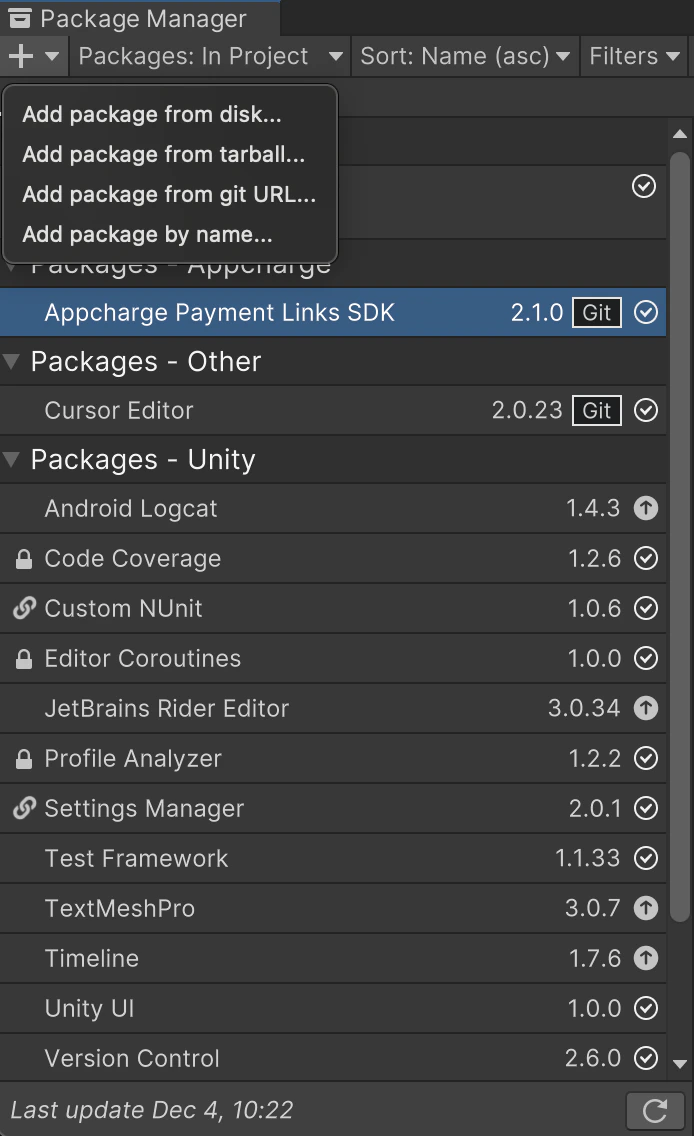 5. Paste the copied HTTPS URL, and click **Add**.