> ## Documentation Index
> Fetch the complete documentation index at: https://docs.appcharge.com/llms.txt
> Use this file to discover all available pages before exploring further.
# Configure the SDK
This guide explains how to configure the Unity Payment Links SDK.
## Step 1 | Locate the Appcharge configuration file
Make sure your Unity project contains the Appcharge configuration file, `AppchargeConfig`, located under `Assets` → `Resources` → `Appcharge`.
This file defines the connection between your project and Appcharge services, and is required for the SDK to function correctly.
### If the file doesn’t exist
If the file isn't there, create one manually:
1. Right-click in your Project window.
2. Select `Create` → `Appcharge` → `Configuration` → `AppchargeConfig`.
This configuration file **must** be located at `Assets` → `Resources` → `Appcharge`.
### If Unity shows that the file is missing
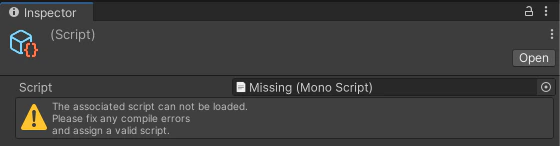 If Unity reports that the configuration file is missing, as shown above, fix it using one of the following options:
1. Delete the existing configuration file and re-create it, **or**
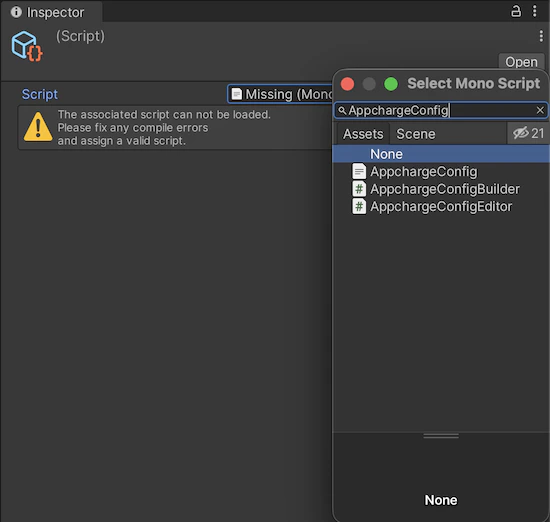
2. Select and apply the missing `AppchargeConfig` file.
If Unity reports that the configuration file is missing, as shown above, fix it using one of the following options:
1. Delete the existing configuration file and re-create it, **or**
2. Select and apply the missing `AppchargeConfig` file.
 ## Step 2 | Integrate platform-specific settings
After verifying your configuration file, continue by integrating Appcharge for your target platform. Each platform requires additional settings to ensure Appcharge Payment Links works correctly.
* [Integrate with iOS](/sdks/payment-links/unity/integrate-with-ios).
* [Integrate with Android](/sdks/payment-links/unity/integrate-with-android).
## Step 2 | Integrate platform-specific settings
After verifying your configuration file, continue by integrating Appcharge for your target platform. Each platform requires additional settings to ensure Appcharge Payment Links works correctly.
* [Integrate with iOS](/sdks/payment-links/unity/integrate-with-ios).
* [Integrate with Android](/sdks/payment-links/unity/integrate-with-android).